Showing posts with label TFS. Show all posts

Thursday, May 7, 2015

Updating your NuGet version from VS2015 CTP to RC

Earlier last week, I had an issue with NuGet, which turned out to be a bug in the bundled CTP NuGet, which is fixed in the RC version:


Well, as it turns out, there are more people having some issues with the CTP version of NuGet. I saw someone on StackOverflow having NuGet issues and I suggested him to update to the RC version since there were some bugs fixed in this new version:


Apparently that was helpful, since the answer based on my suggestion was marked as the answer, which is nice:
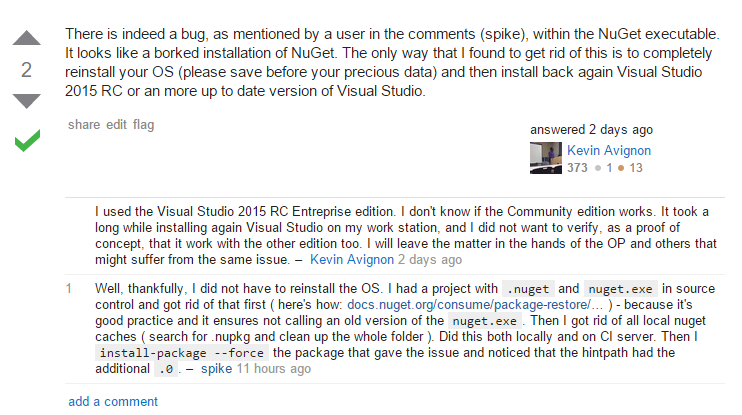
However, unlike Kevin Avignon, I didn't have to reinstall the OS on my CI server, nor on my dev box. What I did to solve this was:


  • Update Visual Studio from CTP to RC on both my local machine and the CI server ( yes, I'm running VS on the CI server. I tried for 2 days setting up the build server without and then I just installed VS ).
  • Since I was messing with NuGet - I followed this tutorial to get rid of the NuGet.exe in my sources, which where there because of the 'Enable NuGet restore for this solution'-menu option in Visual Studio: http://docs.nuget.org/consume/package-restore/migrating-to-automatic-package-restore. Actually, I used the suggested PowerShell script: https://github.com/owen2/AutomaticPackageRestoreMigrationScript
  • Cleared out all the local NuGet cache folders ( find .nupkg files, and clear out those folders ). Did this locally and on the CI server.
  • Cleared out the /packages folder, both locally and on the CI server.
  • Then I ran the install-package command with --force option, in order to re-install FluentValidations ( which was my problem package )
Then I found that the hintpath had the additional .0 in it, which caused the reference to resolve nicely on build-time. After this, the build was also fixed on the CI server.

Tuesday, January 20, 2015

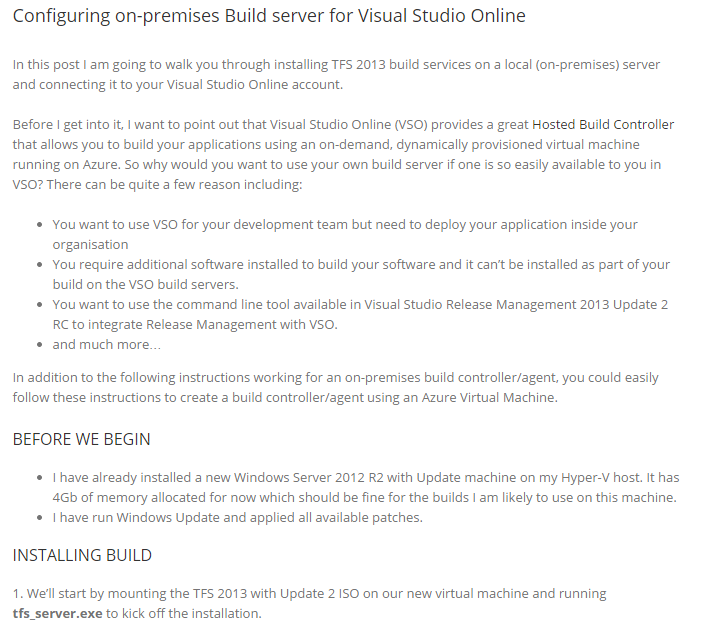
Using a on-premises / Azure VM server for Visual Studio Online builds

We're running low on CI build minutes, actually, I spent the 60 minutes in 1 day. So I'm setting up a build controller on an on-prem VM. Turns out it's a breeze to hook the build controller up to the Visual Studio Online account. Check out this post by Anthony Borton on how it's done.


Thursday, January 15, 2015

Visual Studio ALM Rangers: get your branching strategy right

We've moved source control over to TFS Online with GIT as the version control system. This is a good way to re-think our branching strategy. I was looking for some resources on the internet, because I think I want to move over to GitFlow but I need to read up on the pros and cons.

So if you don't know what GitFlow is - here's a great explanation: https://www.atlassian.com/git/tutorials/comparing-workflows/forking-workflow.

Then I found this CodePlex site that offers several guide for Application LifeCycle Management (ALM) on TFS. Check it out here: http://vsarbranchingguide.codeplex.com/ - go to the downloads page and find the PDF guide.


Thursday, February 6, 2014

C# discussions had last week

At the project I'm currently working on, we often use TFS code review - here's how:


This week we had some interesting discussions on:

It's not all amazing important stuff, but it was interesting nevertheless.

Saturday, June 15, 2013

Nice... Running TFS 2012 on my home server

At the office we're using TFS 2012 and I'm starting to like it. Coming from TeamCity, JIRA with GreenHopper and Subversion Edge, it took me a little time getting used to it. Since our office upgraded to TFS 2012 some colleagues came up to me with stories like 'did you know that in tfs2012 you can do so and so ...' and in my mind I thought 'so ... you're saying it wasn't available before?'. In a lot of ways TFS still has a long way to go and I'm sceptical it will ever reach the JIRA or GreenHopper level, but it is a pretty decent tool that I'm delighted to work with.

Burndowns, issue drag&dropping, those are some examples of stories everyone's excited about, that I had been using for more than 2 years in JIRA.

Anyway - I've got it running on my HP DL380 now:
Administrative tasks for the TFS environment are done using the TFS Administrative application on the server itself:


But most of the other stuff can be administrated using the web-interface:


So, I'm all set now to get started!


Wednesday, May 22, 2013

Plastic SCM - a distributed version control system with a focus on branching

On one of the .NET Rocks! shows I heard about Plastic SCM, a Distributed Version Control System (DVCS) that wants to be different from things like GIT by focussing a lot on branching/merging. They offer a GUI for doing these things - see this screenshot from their website:


Here's a video explaining the process:


Looks really cool, although I'm sceptical whether our company will switch to this thing. Seems to be free for 'small' teams I've heard! Check it out.