Showing posts with label AngularJS. Show all posts

Friday, August 14, 2015

Heisenberg-effect while debugging JavaScript code in Chrome

I had a hard time finding a bug today in some AngularJS code and I think I got peopled by the Chrome JavaScript engine ( V8 right? ). I think it doesn't load variables into memory when it knows it's not going to use it. 

Check out my question here if you're interested on StackOverflow. I was trying to access that $http variable which is being injected into the controller, from the doSubmit function. However - I just had a debugger statement in that function and no direct call to $http. This gave me '$http not defined' errors all the time - so I thought I was doing things wrong with the controllerAs syntax or variable injection.

However, loosly interpreting the Heisenberg principle as 'measuring the system influences the system', turned out to be the case. The console.log() call influenced the system. Because of that line - the $http was not optimized away anymore and it does work if you keep that line.


Interesting stuff. The .NET counterpart of these kind of problems are Debug and Release builds. Check out the in-depth courses by Bart de Smet on C# if you're interested what's the difference is between these type of builds and why you could have NullRef exceptions in .NET code while running a Release build, that never occur in Debug mode.

Tuesday, April 21, 2015

Inspecting AngularJS page load performance using Chrome TimeLine / flame chart

I'm building a couple of prototypes for a page that needs to display around 2000 items in a grid of 3 items with 600+ rows. What we're looking to achieve is a quick page load time, but also no hassle while scrolling.
The case I'm investigating is a little out of the ordinary, in the sense that I assume that I already have the large object in memory. It's not like a more normal case where I send out paged AJAX calls to some REST server.

So, I've created a couple of AngularJS prototypes, which I've analysed with the Chrome Dev tools - the TimeLine tool to be exact. Here are some of my results.

1. Simplest form: load all data into a scope variable
OK, so I started out with the simplest form where I load the 2000 item array into a scope var, and display it using an ng-repeat. Let's see what that does in chrome dev tools:

You get this by opening up dev tools, going to TimeLine - hitting record and reloading the page. After clicking stop - you see this awesome graphical representation of the page load events + nested function calls ( flames ).

The DOMContentLoaded event fires and the AngularJS controller needs 200ms to render everything. Note the green line under the flame chart that shows the number of nodes in the DOM.


2. Infinite scroll.
Then I got an infinite scroll module for AngularJS which I applied. OnLoad I load 9 elements into the scope variable and every time the page event fires, I add another 9.


Page load time drops to 30ms (!) that's awesome. The little flames on the right are the scroll events. They take up about 3-5ms. each. This would be a lot more if I was making AJAX calls obviously,


However, I'm not sure this will give a nice scrolling experience to the user, especially on tablets. That's why I moved to option 3.

3. Seed loading + background loading of the rest
In this prototype, I load enough items to fill up the screen and return from the controller contstructor. Then after a timeout ( 100ms ), I append the rest of the data.


As you can see - a 30ms flame ( so as fast as the infinite scroll solution ) which loads 9 items into the viewmodel and handles the binding. Then after 100ms, I append the rest of the items ( approx 150 ms ). In the browser you see the DOM being built op very quickly and do not notice the rest of the items being loaded. The only thing you can see is the scrollbar jump up after 100ms, when the rest of the items are bound to the viewmodel and generated as HTML.


Right now - the last approach seems the most promising: very quick page load time and 'normal' scroll behavior.

Thursday, February 26, 2015

Deploying bundled/minified AngularJS Application to Azure

I was awarded some of the bounty on the question: "Deploying bundled/minified Durandal Application to Azure". I responded describing how we optimized an AngularJS application at one of the major bank in Holland. 


Sunday, February 1, 2015

Using Angular $resource against Web API 2 backend

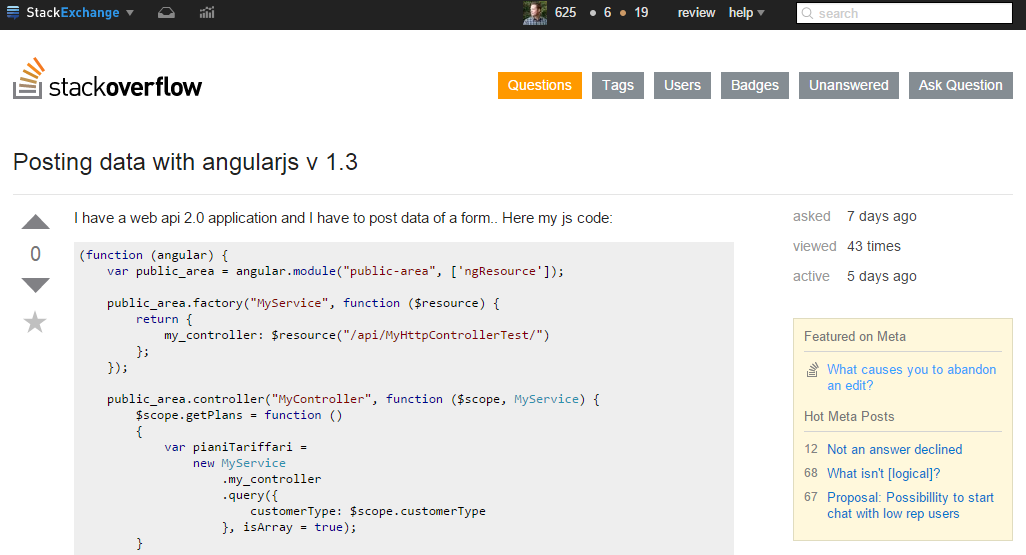
This week I tried answering a question on StackOverflow about using Angular's $resource against a .NET WebAPI v2 backend:


To me it seemed like the poster of this question was not using WebAPI in a RESTful way which caused the trouble with WebAPI. I've seen this before where colleagues are using one WebAPI controller to server different types of objects and then need to do custom routing and what not in order to make it work.
My recommendation would be to not do that. Have 1 controller for 1 type of object and map the HTTP verbs on it.

Having said that, I wanted play around with $resource and did that in a proof-of-concept application that I put on GitHub: https://github.com/jochenvanwylick/SODemoAngularResourceWebAPI

I'm using LightInject for dependency injection ( since that was on my list to try ) and OWIN selfhost to host the WebAPI v2 backend.

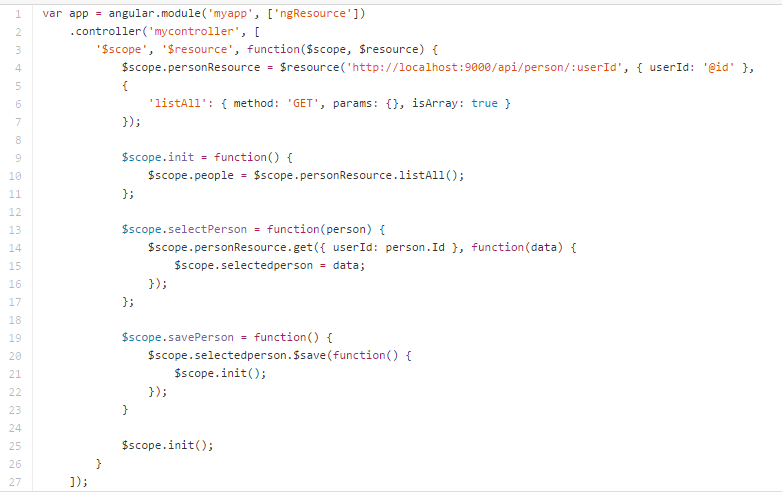
Here's the Angular application that uses the ngResource module:


I added the listAll method in order to talk to the Get() method in the backend. You need to specify that the result is an array as opposed to an object. Once you get an item from resource, you can just save it with $save().

Here's the C# controller that handles all the methods that are being called by AngularJS.

So yeah, it's nice - $resource. I've used an injecteable service thusfar, but will consider using $resource in the future.

Friday, October 17, 2014

I need AngularJS service instances, not singletons

One of the apps we're working with has a bunch of WebApi controllers and a bunch of AngularJS controller talking to them.

So we've got the backend URLs like:
- /api/typeA
- /api/typeB
- /api/typeC
- /api/typeD
- /api/typeE

Yes, we could bundle all the types in one WebApi, but then the object would become quite big and the saving part would require more logic. So we've got separate controllers for every type.

Most controllers only implement GET and POST and we were discussing an elegant way to get that into our app. There were a couple of options:
- Create a Angular service for every WebApi controller
- Create one service that takes the URL with every call
- Do something else ...

AngularJS only provides singletons ( link ) but I would really love to create a service instance that talks to a specific WebApi controller. Therefore I've sent a POC over to my colleague in which I suggest to have Angular inject a factory ( which is a singleton ), which is then able to build instances for each of the WebAPI controllers.

Here's my fiddle: http://jsfiddle.net/jochenvanwylick/0qcwver5/1/


Tuesday, March 18, 2014

Sunday, March 16, 2014

Filtering properties being watched by $scope.$watch in AngularJS

For one of my projects I needed undo/redo functionality. We implemented this by using just saving snapshots of the object to $sessionStorage.

However - we needed an easy way of being notified of object changes. Enter $scope.$watch. This method allows you to watch object for changes.

However - this method does not 'deep watch' into child property values. Also, we needed a bit more control over which model changes would trigger the snapshot mechanism. We solved it by adding a 'hash' method that creates a has of all the object properties that I care about.

Here's what I mean: http://jsfiddle.net/dsr4Y/2/


Sunday, February 2, 2014

Angular JS controller inheritance

Something I didn't know in AngularJS is that controllers can inherit from one another. My team member Pieter pointed this out to me and I think it's going to be very useful for us.

We're building a bunch of screens that have quite similar functionality ( start with a GET, POST on save etc ). In normal JavaScript, one can use prototypical inheritance of course, but that's not as evident with the Angular dependency injection.

However, since controllers can inherit from each other, it is! Check out this question on StackOverflow: http://stackoverflow.com/questions/18461263/can-an-angularjs-controller-inherit-from-another-contoller-in-the-same-module


Next week we'll be doing some refactoring!

Saturday, February 1, 2014

Zone.js

At the recent Angular Conference ng-conf, zone.js was presented. What I get from the video is that it's an execution context that lets you hook into ALL the function calls (including async ones) that are executed within the 'zone'.

This allows you to both instrument them properly ( get execution times ) but also possibly add some behavior before and after. Check it out at https://github.com/btford/zone.js/


Thursday, December 26, 2013

TypeScript and Angular example: TodoMVC

Recently I attended a GREAT presentation by Peter Hilton, about his experience introducing Scala in his company, lessons learned from that, and his view on modern web-apps.

One of the things he mentioned briefly is that you should abstract from the 'base' web languages like CSS and Javascript and get on the LESS/SASS and CoffeeScript/TypeScript train. The same week I head the .NET Rocks! podcast discussing TypeScript support in VS2013 so I think it's about time. They also recalled the expression 'JavaScript is the assembly-language of the web'.

I've been playing around with this stuff, but this is pushing me to start using it professionally. Since we're working on a AngularJS project right now, I wanted to have look at what it would look like to create an AngularJS app with TypeScript. Obviously - this has been done already. Check out TodoMVC:


Check out the links on the left to his GIT repo where you can see how it's all been done.


Sunday, December 22, 2013

Learn F# by example ... In Visual Studio !

After lifting my JavaScript knowledge of my work with AngularJS recently, and KnockoutJS before that, I've been playing around with the functional aspects of the language and really experienced the elegance of it in real-life examples and not just the annoying practicals in Haskell I had to do at university.

Furthermore we had this presentation on Scala and the Play framework which was very interesting. So I decided to have a quick look at F#. I wanted to do a 'File, New Project' thing and start looking at the syntax when I noticed this:


The F# Tutorial project type in Visual Studio. It's great stuff. You open it and you get this big F# source code file showing you pretty much all the basics of F# including:

For example:


Want to learn quickly and by example? Go check it out.

Sunday, August 18, 2013

Reading up on AngularJS best practices

This week I'm starting on a Single Page Application (SPA) for which we decided to go with AngularJS. Can't wait to get started and for prep I've been reading up an a few 'best practices' and 'lessons learned'. Here are some interesting articles:

Lessons Learned: A Year with a Large AngularJS Project
Code Organization in Large AngularJS and JavaScript Applications
AngularJS Best Practices: I’ve Been Doing It Wrong! Part 1 of 3 part 2 and part 3
While you're at it - check out the AngularJS YouTube channel