
Showing posts with label ASP.NET vNext. Show all posts
Showing posts with label ASP.NET vNext. Show all posts
Monday, October 26, 2015
David Fowler - ASP.NET 5 Deconstructed
Super interesting talk by David Fowler on the new changes in vNext. Check it out if you want to get an idea how the request lifetime in vNext is different from the 'current stack' 4.5.1!


Friday, August 28, 2015
Updating NPM on Windows
Apparently NPM updates more frequently than NodeJS does. I'm trying to keep edge versions since there's quite a bit of things happening with the new cross-platform build agent, npm and the MAX_PATH issue on Windows. Apparently - NPM likes to create very deep folder structures - and windows doesn't like that too much.


Here's the solution:

Credits: http://stackoverflow.com/a/26908900/896697 - I used option 3 btw.

I've encountered problems with this on my CI/CD server and that's why I'm trying to keep the agent + NPM as up to date as possible. I thought running `npm update -g npm` would solve it - but it doesn't - see:


Credits: http://stackoverflow.com/a/26908900/896697 - I used option 3 btw.
Tuesday, August 18, 2015
Creating and running a .NET without Visual Studio or anything over 100 megs...
At home I've got an older laptop with an SSD that isn't that big. This eventing I wanted to fiddle around a bit but I didn't want to install that massive Visual Studio 2015 and everything it comes with.
So ... vNext to the rescue. Here's what you need to do to get going. ( I'm assuming you've got nothing on your box installed ).
1. Get the DNX runtime and the DNVM host. Don't know what I'm talking about ? Check this out. In short - you just need to open up a command window ( in admin mode ) and run:
2. Install node from the node website.
3. Reboot your machine. This is convenient because it loads `npm` and `dnvm` / `dnu` commands into the path.
4. OK - once you're machine is back up, open up a command window and we need to install an dnx-runtime - so type `dnvm upgrade`. Now you should have a runtime installed when you type `dnvm list`.
5. Install Yeoman! - this will help you scaffold the app. `npm install -g yo` will get you there. ( meaning: Node Package Manager ( NPM ) install the YeoMan! clr globally ).
6. If you want to scaffold something with YeoMan! - you need to install the generator itself through the Node Package Manager (NPM), so : `npm install -g generator-aspnet`. You can check out all the other generators over at the YeoMan website.
7. Cool: now we can scaffold our vNext app: `yo aspnet`. This will present a YeoMan! scaffolding menu where you can select the type of app you want. I'm going for console app for this walkthrough.

8. Once that's done - you can see the scaffolded files in the newly created folder:

As you can see - the scaffolded code already contains a Console.WriteLine - so can compile and run this - and should see something already in the console. So:
9. `dnu restore` . This will go out and get all the dependencies defined in the project.json onto your machine. If you don't do this - you will not be able to compile / build because of missing dependencies.
10. Now we can build - so `dnu build`. There you go - there's a /bin folder containing the assembly.
11. Since we run the app within the runtime, the run command is a `dnx` command : `dnx . run`.

Et voila: vNext hello world without Visual Studio!
So ... vNext to the rescue. Here's what you need to do to get going. ( I'm assuming you've got nothing on your box installed ).
1. Get the DNX runtime and the DNVM host. Don't know what I'm talking about ? Check this out. In short - you just need to open up a command window ( in admin mode ) and run:
@powershell -NoProfile -ExecutionPolicy unrestricted -Command "&{$Branch='dev';iex ((new-object net.webclient).DownloadString('https://raw.githubusercontent.com/aspnet/Home/dev/dnvminstall.ps1'))}"
2. Install node from the node website.
3. Reboot your machine. This is convenient because it loads `npm` and `dnvm` / `dnu` commands into the path.
4. OK - once you're machine is back up, open up a command window and we need to install an dnx-runtime - so type `dnvm upgrade`. Now you should have a runtime installed when you type `dnvm list`.
5. Install Yeoman! - this will help you scaffold the app. `npm install -g yo` will get you there. ( meaning: Node Package Manager ( NPM ) install the YeoMan! clr globally ).
6. If you want to scaffold something with YeoMan! - you need to install the generator itself through the Node Package Manager (NPM), so : `npm install -g generator-aspnet`. You can check out all the other generators over at the YeoMan website.
7. Cool: now we can scaffold our vNext app: `yo aspnet`. This will present a YeoMan! scaffolding menu where you can select the type of app you want. I'm going for console app for this walkthrough.

8. Once that's done - you can see the scaffolded files in the newly created folder:

As you can see - the scaffolded code already contains a Console.WriteLine - so can compile and run this - and should see something already in the console. So:
9. `dnu restore` . This will go out and get all the dependencies defined in the project.json onto your machine. If you don't do this - you will not be able to compile / build because of missing dependencies.
10. Now we can build - so `dnu build`. There you go - there's a /bin folder containing the assembly.
11. Since we run the app within the runtime, the run command is a `dnx` command : `dnx . run`.

Et voila: vNext hello world without Visual Studio!
Thursday, August 6, 2015
Setting up CD for vNext app with new VSO build agent
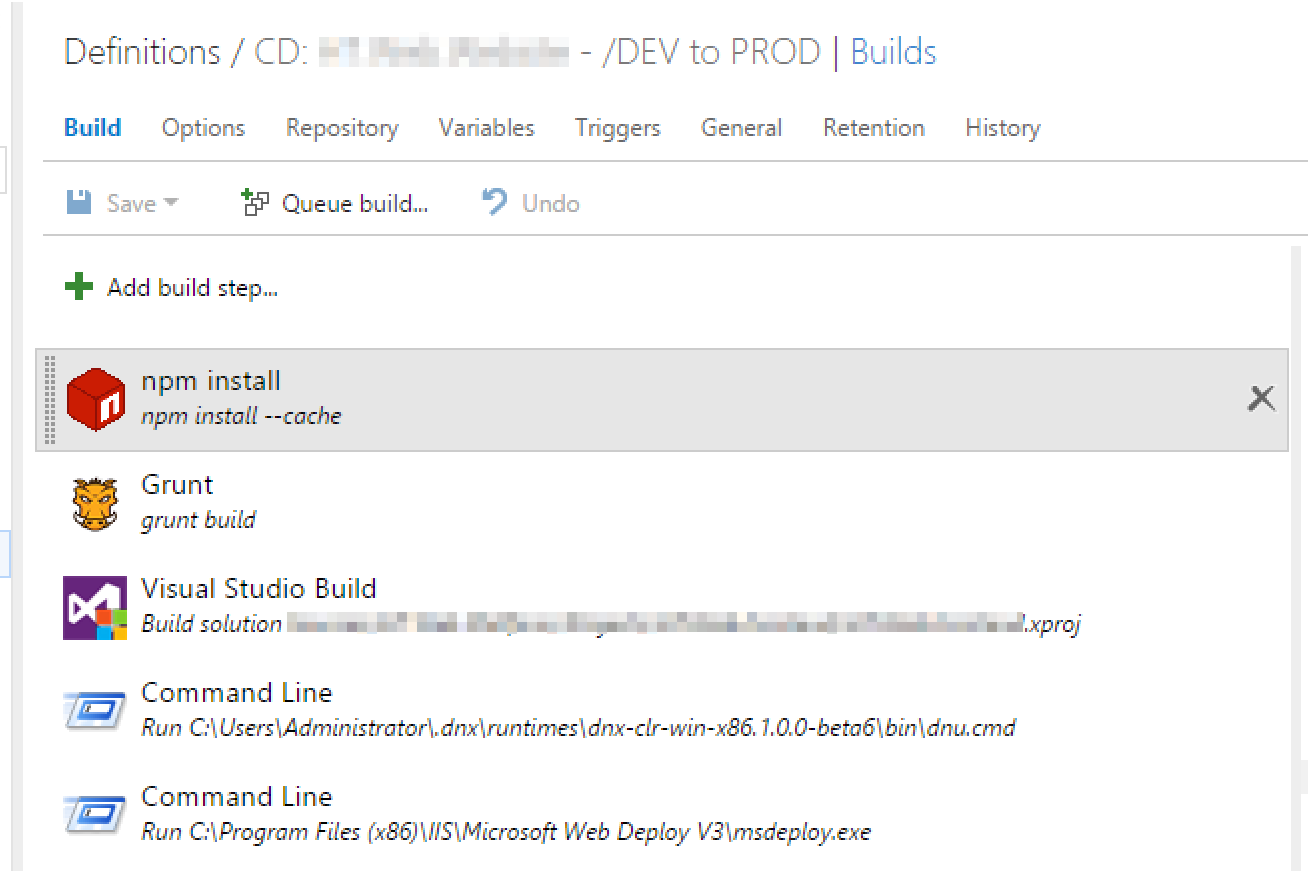
I spent a day today setting up continuous deployment for my vNext / ASP.NET 5 apps. I was heading for another tumbleweed award on StackOverflow, because nobody responded to my cry for help.
Anyway - I figured it out. Check out my own answer on StackOverflow if you want to know how to do it ( right now - until it will become easier ): http://stackoverflow.com/questions/31852633/setting-up-cd-for-vnext-app-with-new-vso-build-agent/31859260#31859260
Thursday, July 23, 2015
ASP.NET 5 Schedule and Roadmap
I thought ASP.NET 5 was pretty much done, but apparently Microsoft expects the RC to be released in november 2015:

link: https://github.com/aspnet/Home/wiki/Roadmap
Tuesday, July 21, 2015
Released yesterday: Visual Studio 2015, ASP.NET 4.6, ASP.NET 5 & EF 7 Previews
Check it out: a list of all the new goodies that are about to roll out of Redmond: http://weblogs.asp.net/scottgu/released-today-visual-studio-2015-asp-net-4-6-asp-net-5-ef-7-previews

Most of it isn't actually 'that' new - but they're starting to anounce it now.

Most of it isn't actually 'that' new - but they're starting to anounce it now.
Saturday, July 11, 2015
Getting started with ASP.NET vNext - DNVM and the DNX
I've built a couple of sites now using ASP.NET vNext and I love it. However - the thing that most people will think is really 'new', is working with Node, NPM, Bower and Grunt/Gulp.
Sure - that's the thing that you'll notice while developing with it the most, but that was actually just the logical next step. Node devs and people on Macs writing SPA's were doing that years ago already. I found that I blogged about it back in 2013 already (damn, time flies). So that was to be expected, really.
However - I do think that a lot of people aren't going to be too thrilled with this, since this is a whole toolsuite you need to familiarize yourself with in one go.
However - that's all workflow and node. What's actually something you barely notice is that the way the .NET framework is used is completely different: http://www.sblackler.net/2015/05/02/Up-And-Running-With-DNX-DNVM-DNU/

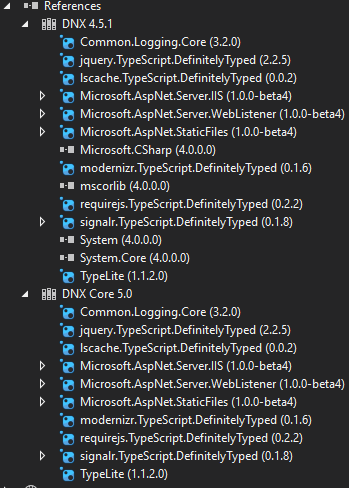
This DNVM is runs on many platforms, which allows you to make your app cross-plat.The app itself takes the dependency on the DNX ( execution environment ). From what I understand, the DNVM can even manage different versions of the execution environment and switch between them.

"That's why it's still in beta" ...:

Anyway - more on how to write vNet apps soon!
Sure - that's the thing that you'll notice while developing with it the most, but that was actually just the logical next step. Node devs and people on Macs writing SPA's were doing that years ago already. I found that I blogged about it back in 2013 already (damn, time flies). So that was to be expected, really.
However - I do think that a lot of people aren't going to be too thrilled with this, since this is a whole toolsuite you need to familiarize yourself with in one go.
However - that's all workflow and node. What's actually something you barely notice is that the way the .NET framework is used is completely different: http://www.sblackler.net/2015/05/02/Up-And-Running-With-DNX-DNVM-DNU/

This DNVM is runs on many platforms, which allows you to make your app cross-plat.The app itself takes the dependency on the DNX ( execution environment ). From what I understand, the DNVM can even manage different versions of the execution environment and switch between them.
"That's why it's still in beta" ...:

Anyway - more on how to write vNet apps soon!
Friday, July 10, 2015
I'm having issues building vNext apps on my CI server ...
I've had some issues trying to get vNext applications to build on my CI server. I'm using Visual Studio Online together with the TFS agent on a local server for my builds. However - I couldn't get the build to work on the server. It's complaining that the DNX is not installed.
So I checked on StackOverflow - but didn't get an answer:

So I decided to switch to the new VSO builds and thought I got it going, until I moved the (new VSO specific - not TFS anymore ) build agent under a service account. Then the error message returned. Therefore I think that my local service account has access to the DNX versions, but the TFS service account and the one for the new build agent, don't.
So I've asked the boys over at Microsoft what to do:

Friday, January 16, 2015
Playing with JSON Schema
All the new ( 'vNext' ) stuff coming from Microsoft seems to be using JSON configuration files and less XML configuration. Today I was looking into my Azure Scheduled Job configuration and saw this:
Following the link to the JSON schema file shows you what it looks like:
I have to say I'm not sure what my position is on this. I'm a strong believer in 'the right tool for the job'. So if you want to write a textfile with information but want to enforce a schema - shouldn't you just use XML? XML with an XSD solved this problem.
You want to send data back and forth between a webserver and a client, without a lot of hassle and overhead and which works great with JavaScript ? Use JSON. JavaScript lets you get away with everything - so does JSON.
Don't get me wrong - I like all the developments in software and this surely adds to something. JSON configuration files wouldn't be possible in a product like Visual Studio if not for a schema. But one should not be affraid of it's dynamic nature and therefore make everything strongly typed. Embrace the dynamic nature of JavaScript and JSON or pick a different tool IMHO.
Anyway - I played around with it a bit and here are some interesting resources:
{
  "$schema": "http://schemastore.org/schemas/json/webjob-publish-settings.json",
  "webJobName": "myjob-dev",
  "startTime": "2015-01-15T00:00:00+01:00",
  "endTime": "2015-01-16T00:00:00+01:00",
  "jobRecurrenceFrequency": "Day",
  "interval": 1,
  "runMode": "Scheduled"
}
Following the link to the JSON schema file shows you what it looks like:
{
 "title": "JSON schema for Azure Webjobs configuration files",
 "$schema": "http://json-schema.org/draft-04/schema#",

 "type": "object",
 "required": [ "runMode" ],

 "definitions": {
  "shared": {
   "properties": {
    "webJobName": {
     "type": "string",
     "description": "The name of the Azure Webjob."
    },
    "startTime": {
     "type": "string",
     "format": "date-time",
     "description": "The start time of a scheduled job. Example. 2014-06-11T00:00:00-08:00"
    },
    "endTime": {
     "type": "string",
     "format": "date-time",
     "description": "The end time of a scheduled job. Example. 2014-06-12T00:00:00-08:00"
    },
    "jobRecurrenceFrequency": {
     "type": "string",
     "enum": [ "Second", "Minute", "Hour", "Day", "Week", "Month" ],
     "description": "The frequency metric used with the 'interval' property."
    },
    "interval": {
     "type": "integer",
     "description": "The interval of how often the Azure Webjob should run. Use it with the 'intervalType' property."
    }
   }
  },
  "scheduled": {
   "required": [ "webJobName", "startTime", "endTime", "jobRecurrenceFrequency", "interval" ],
   "allOf": [ { "$ref": "#/definitions/shared" } ],
   "properties": {
    "runMode": {
     "type": "string",
     "enum": [ "Scheduled" ],
     "description": "Determines the run mode of the Azure Webjob. \n\n Triggered: manually triggered \n Scheduled: runs on a specific schedule \n Continuous: runs all the time"
    }
   }
  },
  "notScheduled": {
   "required": [ "runMode" ],
   "allOf": [ { "$ref": "#/definitions/shared" } ],
   "properties": {
    "runMode": {
     "type": "string",
     "enum": [ "Continuous", "OnDemand" ],
     "description": "Determines the run mode of the Azure Webjob. \n\n Triggered: manually triggered \n Scheduled: runs on a specific schedule \n Continuous: runs all the time"
    }
   }
  }
 },

 "oneOf": [
  { "$ref": "#/definitions/scheduled" },
  { "$ref": "#/definitions/notScheduled" }
 ]
}
So - JSON Schema for JSON is what XSD is for XML: you define a schema in which you define what information must or can be present inside an element.I have to say I'm not sure what my position is on this. I'm a strong believer in 'the right tool for the job'. So if you want to write a textfile with information but want to enforce a schema - shouldn't you just use XML? XML with an XSD solved this problem.
You want to send data back and forth between a webserver and a client, without a lot of hassle and overhead and which works great with JavaScript ? Use JSON. JavaScript lets you get away with everything - so does JSON.
Don't get me wrong - I like all the developments in software and this surely adds to something. JSON configuration files wouldn't be possible in a product like Visual Studio if not for a schema. But one should not be affraid of it's dynamic nature and therefore make everything strongly typed. Embrace the dynamic nature of JavaScript and JSON or pick a different tool IMHO.
Anyway - I played around with it a bit and here are some interesting resources:
- The site with all JSON Schema draft specs: http://json-schema.org/documentation.html
- JSON Schema validator: https://json-schema-validator.herokuapp.com/
- Great website with information: http://spacetelescope.github.io/understanding-json-schema/structuring.html
So here's my attempt at a schema:
{
   "definitions":{
      "car":{
         "title":"Car schema",
         "type":"object",
         "properties":{
            "make":{
               "description":"The manufacturer of the car",
               "type":"string"
            },
            "model":{
               "description":"The model of the car",
               "type":"string"
            }
         },
         "required":[ "make", "model" ]
      },
      "person":{
         "title":"Person schema",
         "type":"object",
         "properties":{
            "firstName":{
               "description":"The firstname of the person",
               "type":"string"
            },
            "lastName":{
               "description":"The family name of the person",
               "type":"string"
            },
            "cars":{
             "type" : "array",
             "items" : [ { "$ref":"#\/definitions\/car" } ]
            }
         },
         "required":[
            "firstName",
            "lastName",
            "cars"
         ]
      }
   },
   "$ref":"#\/definitions\/person"
}
Which validates this JSON:
{
 "firstName" : "John",
 "lastName" : "Doe",
 "cars" : [
 { "make" : "Ford", "model" : "T" },
 { "make" : "Ford", "model" : "Galaxy" }
 ]
}
Note the $ref thing - makes everything nice and structured. Other than that it's all pretty straight forward.
We're going to see a whole lot more of JSON schema in the future I think - so you might as well read up on it!

We're going to see a whole lot more of JSON schema in the future I think - so you might as well read up on it!
Sunday, November 16, 2014
Awesome: I'm running Windows 10 with Visual Studio 2015
Nice, I got the Windows 10 preview iso and put it on my trusty HP DL 380. Then got the Visual Studio 2015 Ultimate preview, so I'm running stuff from the futue :).

Cool. Now I can play around with ASP.NET vNext and maybe the new C#, but I'm not sure about that.
Subscribe to:
Posts (Atom)