I've had some issues trying to get vNext applications to build on my CI server. I'm using Visual Studio Online together with the TFS agent on a local server for my builds. However - I couldn't get the build to work on the server. It's complaining that the DNX is not installed.
So I checked on StackOverflow - but didn't get an answer:
So I decided to switch to the new VSO builds and thought I got it going, until I moved the (new VSO specific - not TFS anymore ) build agent under a service account. Then the error message returned. Therefore I think that my local service account has access to the DNX versions, but the TFS service account and the one for the new build agent, don't.
So I've asked the boys over at Microsoft what to do:
Showing posts with label CI. Show all posts
Friday, July 10, 2015
Thursday, May 7, 2015
Updating your NuGet version from VS2015 CTP to RC
Earlier last week, I had an issue with NuGet, which turned out to be a bug in the bundled CTP NuGet, which is fixed in the RC version:
Well, as it turns out, there are more people having some issues with the CTP version of NuGet. I saw someone on StackOverflow having NuGet issues and I suggested him to update to the RC version since there were some bugs fixed in this new version:
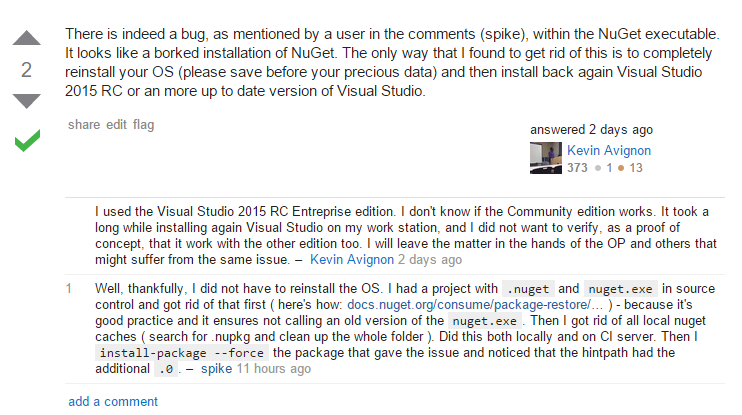
Apparently that was helpful, since the answer based on my suggestion was marked as the answer, which is nice:
However, unlike Kevin Avignon, I didn't have to reinstall the OS on my CI server, nor on my dev box. What I did to solve this was:
Well, as it turns out, there are more people having some issues with the CTP version of NuGet. I saw someone on StackOverflow having NuGet issues and I suggested him to update to the RC version since there were some bugs fixed in this new version:
Apparently that was helpful, since the answer based on my suggestion was marked as the answer, which is nice:
However, unlike Kevin Avignon, I didn't have to reinstall the OS on my CI server, nor on my dev box. What I did to solve this was:
- Update Visual Studio from CTP to RC on both my local machine and the CI server ( yes, I'm running VS on the CI server. I tried for 2 days setting up the build server without and then I just installed VS ).
- Since I was messing with NuGet - I followed this tutorial to get rid of the NuGet.exe in my sources, which where there because of the 'Enable NuGet restore for this solution'-menu option in Visual Studio: http://docs.nuget.org/consume/package-restore/migrating-to-automatic-package-restore. Actually, I used the suggested PowerShell script: https://github.com/owen2/AutomaticPackageRestoreMigrationScript
- Cleared out all the local NuGet cache folders ( find .nupkg files, and clear out those folders ). Did this locally and on the CI server.
- Cleared out the /packages folder, both locally and on the CI server.
- Then I ran the install-package command with --force option, in order to re-install FluentValidations ( which was my problem package )
Then I found that the hintpath had the additional .0 in it, which caused the reference to resolve nicely on build-time. After this, the build was also fixed on the CI server.
Thursday, February 5, 2015
Easy TeamCity Installation with Docker - by Ariya Hidayat
A colleague is working on a Ruby project mostly by himself and doesn't have a CI environment. So I decided to install TeamCity for him to play around with.
Since I've got my own projects to finish, I needed this to take the least amount of time, so I decided to see whether it's possible to use Docker, and obviously it is.
After setting up a fresh Ubuntu 14.10 server, installing docker ( apt-get install docker.io ) you're just 2 commands away from having TeamCity up-and-running:
docker run -dt -name teamcity_server -p 8111:8111 ariya/centos6-teamcity-serverand
docker run -e TEAMCITY_SERVER=http://buildserver:8111 -dt -p 9090:9090 ariya/centos6-teamcity-agent
Subscribe to:
Posts (Atom)